
Writopin
How Writopin keeps your Pinterest account safe
Review how account authorization, approval and billing work before you connect Pinterest or schedule a Pin.
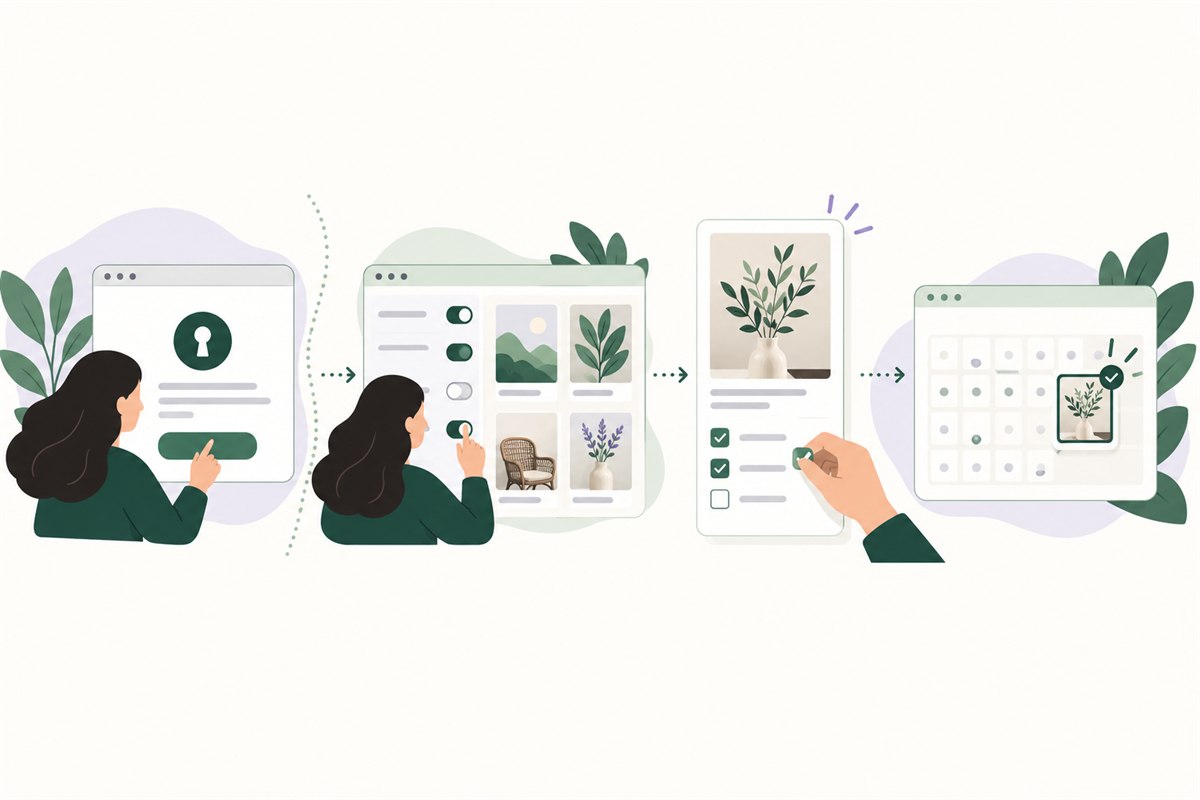
Quick answerWritopin connects to Pinterest through its own authorization screen. You choose whether to allow the requested account, board and Pin access; Writopin never sees your Pinterest password. Generated Pins wait as drafts, and only Pins you approve and confirm are scheduled or published.
What Writopin does
Writopin uses Pinterest authorization to read account and board information and to publish Pins after you approve and confirm them.
What you control
You grant or decline Pinterest access, review what Writopin requests, approve each Pin, and can disconnect your account.
The process
How it works
Open Pinterest authorization
Sign in on Pinterest’s own screen.
Review the requested access
Choose whether to allow the account, board and Pin permissions shown.
Review and approve Pins
Check each design and its publishing details in Writopin.
Disconnect when you choose
Remove the account connection from your Writopin settings.
How does the Pinterest connection work?
When you connect an account, Writopin sends you to Pinterest’s authorization screen. You sign in there and review the access request. Your Pinterest password is entered on Pinterest, not in Writopin, and Writopin never sees it.
The product requests access to read account details, boards and Pins, and to write the board and Pin information needed by its features. When secret-board support is enabled, the request also includes access for secret boards and Pins. The permission names are shown by Pinterest before you authorize.
What can Writopin do with those permissions?
Read access lets Writopin identify the connected account and show available boards and Pin details. Write access supports the publishing actions you confirm. The authorization screen explains the access being requested, and you can decline it or disconnect the account later.
Disconnecting removes the stored Pinterest tokens and pauses that account’s scheduled Pins. Reconnect the account if you want Writopin to publish future scheduled items again.
Why does every Pin need your approval?
Writopin can prepare drafts from articles, blog posts and ideas, but a draft does not publish itself. You review the design and its title, description, destination and board, then approve the version you want and confirm a schedule or direct publishing action.
The approval step gives you a chance to check that the Pin is accurate, uses images you have the right to use and points to the correct destination. Writopin does not guarantee that Pinterest will accept or keep every Pin.
What happens to your data and payments?
The Privacy Policy describes the workspace data Writopin stores, the services that process it, retention, export and deletion. Workspace data can be exported or deleted in the settings described there. Review the full policy for details before connecting an account.
Payments are handled by Stripe. Card details go to Stripe and never reach Writopin. Writopin keeps the customer and subscription references needed to manage billing.
What account controls do you have?
You can disconnect a Pinterest account at any time. The Privacy Policy also describes how to export workspace data, delete a workspace and delete your account. Deleting an account and deleting a workspace are separate actions, so review the policy before choosing either.
Writopin has no public security contact address or certification listed in the product materials. This page avoids making claims about certifications, uptime or security guarantees.
Writopin does not claim a security certification, uptime guarantee or that Pinterest will accept every Pin. Read the Privacy Policy for data details.
Page content last reviewed 2026-10-17.
Built around your review
You choose what goes live
- You approve each Pin before it is scheduled or published.
- You sign in to Pinterest on Pinterest’s own authorization screen.
- Disconnecting removes stored tokens and pauses scheduled Pins.
- Stripe handles payments; card details do not reach Writopin.
Take a closer look at Writopin
Make Pins you are proud of.
Start with the free plan: no card needed. Upgrade when you need more credits or accounts.
Create your free account